
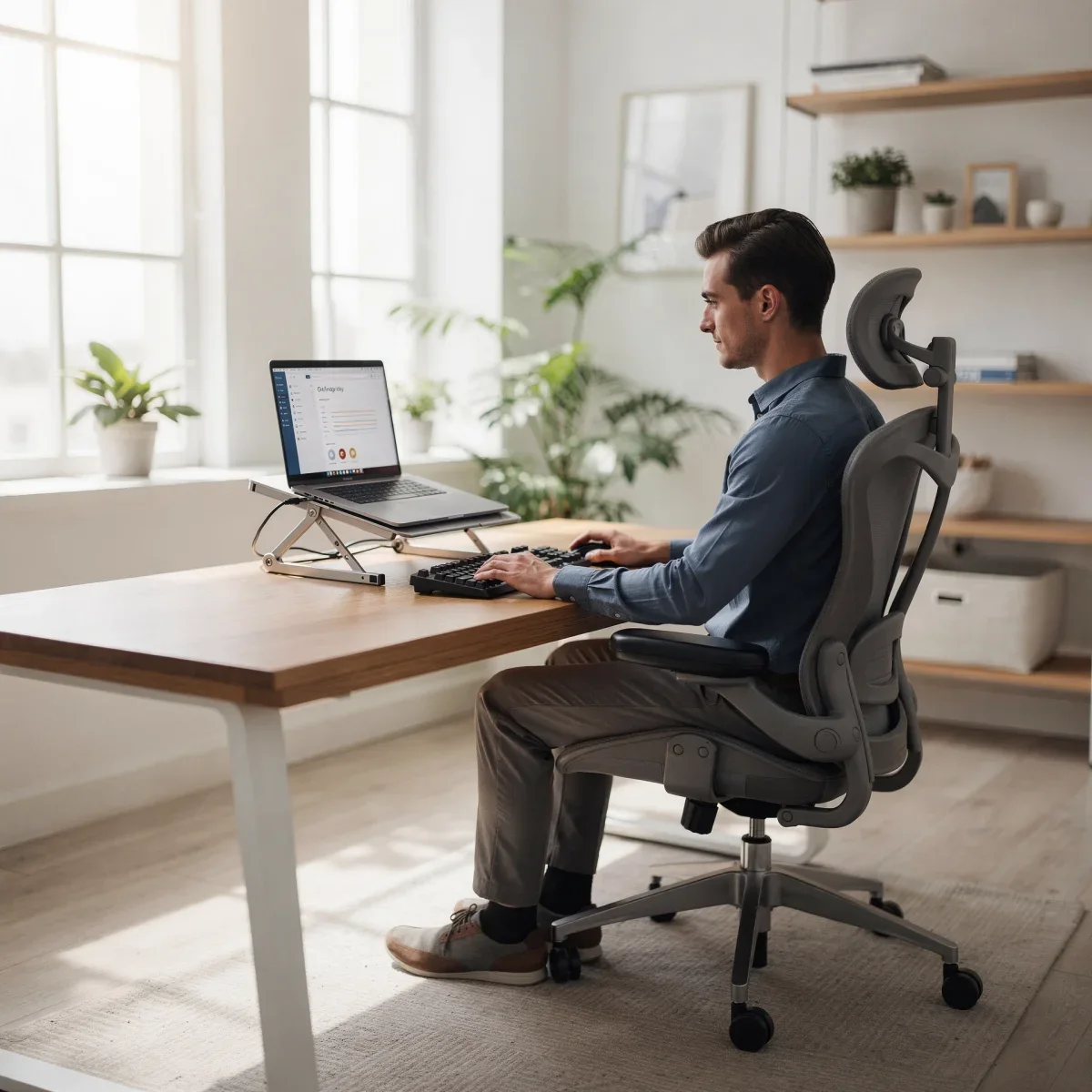
If you spend hours hunched over your screen every day, you probably know the ache of tight shoulders, a sore lower back, and a stiff neck. Laptops offer incredible portability, but their attached keyboard and screen design almost forces you into poor alignment. Mastering laptop posture basics is the single most effective way to eliminate workday fatigue and protect your spinal health.
Advertisements
The Laptop Ergonomic Dilemma and Your Spine
Laptops were originally engineered for brief travel sessions, not eight-to-ten-hour daily grinds. When your keyboard is at comfortable typing height, the screen is inevitably too low, forcing your neck into a downward angle. Conversely, placing the laptop high enough for your eyes forces your arms and shoulders to elevate awkwardly.
This persistent downward gaze creates a condition commonly referred to as "tech neck." For every inch your head tilts forward, the relative weight resting on your cervical spine increases dramatically. An adult head weighs roughly 10 to 12 pounds in neutral alignment, but at a 45-degree forward tilt, the strain on your neck muscles surges to nearly 50 pounds.
Core Principles of Neutral Body Alignment
Good posture is not about sitting ramrod straight with tense muscles. Instead, it centers on maintaining a neutral spine where your bones and joints bear weight naturally without excessive muscular effort.
- Eye Level Alignment: The top third of your display should sit directly at or slightly below your natural horizontal line of sight.
- 90-Degree Rule for Limbs: Your elbows, hips, and knees should remain at roughly 90 to 100-degree angles to promote healthy circulation.
- Feet Firm on the Floor: Keep your feet flat on the ground or supported by an angled footrest to relieve pressure from your lumbar spine.
- Relaxed Shoulders: Keep your shoulders dropped away from your ears, with your upper arms resting close to your torso.
- Neutral Wrists: Your wrists should remain straight and flat, avoiding sharp upward or downward bends while typing.
Essential Workstation Adjustments for Laptop Users
You do not need an expensive corporate office budget to fix your posture. A few strategic, low-cost modifications can transform any makeshift dining table or home desk into an ergonomic workstation.
| Equipment | Primary Function | Quick Budget Alternative |
|---|---|---|
| Laptop Riser / Stand | Elevates screen to eye level to prevent forward head tilt | Stack of sturdy hardcover books or a solid storage box |
| External Keyboard & Mouse | Allows arms and wrists to rest in a relaxed 90-degree position | Basic compact USB or Bluetooth peripherals from Best Buy or Amazon ($20-$35) |
| Lumbar Support Cushion | Preserves the natural inward curve of your lower back | Rolled bath towel placed behind your lower back |
| Adjustable Office Chair | Maintains proper hip-to-knee alignment and thigh support | Firm dining chair padded with a dense foam seat cushion |
Daily Movement Habits to Combat Static Strain
Even the most perfectly aligned desk setup becomes harmful if you stay completely stationary for hours. Muscles stiffen, spinal discs compress, and blood flow slows down when movement is absent.
Adopt the 20-20-20 rule for eye and neck relief: every 20 minutes, look at an object at least 20 feet away for at least 20 seconds. Pair this with quick micro-movements:
- Chin Tucks: Draw your head straight back as if making a gentle double chin, hold for five seconds, and release to reset cervical alignment.
- Chest Openers: Clasp your hands behind your lower back, squeeze your shoulder blades together, and open your chest to reverse forward rounding.
- Seated Hip Stretches: Cross one ankle over the opposite knee (figure-four stretch) and lean forward slightly to release tight glutes and hips.
Quick Takeaways
- Laptops cause neck strain because the screen and keyboard cannot be independently positioned without external accessories.
- Separate your screen and input tools: elevate the laptop on a stand and use an external keyboard and mouse at elbow level.
- Change positions frequently and practice brief posture resets every 30 to 60 minutes to maintain blood flow and spinal mobility.
Frequently Asked Questions
What is the best sitting posture when using a laptop?
Keep your back supported, feet flat on the floor, elbows bent at 90 degrees, and the top of the screen at eye level using a laptop stand and external keyboard.
Are laptop stands worth buying?
Yes. A laptop stand is the most cost-effective tool to eliminate forward head tilt and neck compression, provided you pair it with a separate keyboard and mouse.
Can poor laptop posture cause headaches?
Yes. Straining your neck muscles can pinch nerves and trigger tension headaches that radiate from the base of your skull toward your forehead and temples.
Implementing these simple laptop posture basics takes only a few minutes, but the payoff in energy, focus, and long-term joint health is massive. Start by raising your screen today and notice how much lighter your neck and shoulders feel by the end of your workday.
This article is for informational purposes only and is not a substitute for professional medical advice. Talk to your doctor before making changes to your health routine.